

A Modbus request that reads a temperature and a Modbus request that rewrites a setpoint are the same size: twelve bytes. The difference sits in byte eight, the function code. Much of the easy Modbus misuse on a plant network can be caught by reading that one byte and asking who sent it.
This post sorts the function codes into those that deserve an alert and those that only need a baseline. Then it turns both into an allow-list a firewall or monitoring tool can enforce. A shorter second part covers OPC UA, where the protocol is secure on paper and the risk lives in the settings.
Why anyone who can reach port 502 can write to your PLC
Modbus was published by Modicon in 1979 for serial links between controllers and programming panels, on networks where everything on the wire was trusted. Modbus TCP carried that design onto Ethernet on TCP port 502. It has no authentication, no encryption, no message integrity and no replay protection.
In practice, any host that can open a connection to port 502 can read and write. The device does not know or care whether the request came from the HMI, an engineering laptop or something that arrived on a USB stick last week. A captured write can be sent again later and the device will act on it again.
A secure variant exists. Modbus/TCP Security wraps the protocol in TLS with X.509 certificates and role information, on TCP port 802, and the Modbus Organization published it in 2018. Practitioners report limited adoption, and no adoption figure has been published. For most plants, the control is the network around Modbus, not the protocol itself.
The frame in one paragraph
A Modbus TCP message starts with a 7-byte MBAP header. It holds a 2-byte transaction ID that pairs each response with its request, a 2-byte protocol ID that is always zero, a 2-byte length counting every byte after it, and a 1-byte unit ID for the device behind a gateway. Then comes the PDU: one function code byte, then addresses, counts and values, all in clear text. Here is a request that writes the value 1500 into holding register address 16 on unit 1:
| Bytes | Field | Value | Meaning |
|---|---|---|---|
| 1 to 2 | Transaction ID | 00 01 | Request number 1 |
| 3 to 4 | Protocol ID | 00 00 | Modbus |
| 5 to 6 | Length | 00 06 | Six bytes follow |
| 7 | Unit ID | 01 | Device 1 |
| 8 | Function code | 06 | Write Single Register |
| 9 to 10 | Register address | 00 10 | Address 16 |
| 11 to 12 | Value | 05 DC | 1500 |
Change byte eight to 03, and the last two bytes to 00 01, and the same twelve bytes ask to read one register instead. That is why function-code filtering works: the intent of every Modbus request is stated in one fixed position, unencrypted.
Read codes set your baseline; they rarely deserve an alarm
Four common function codes read data, and on a working plant they run all day:
- FC 1 (0x01) Read Coils: on/off outputs.
- FC 2 (0x02) Read Discrete Inputs: on/off inputs such as limit switches.
- FC 3 (0x03) Read Holding Registers: read/write registers, usually setpoints, configuration and control outputs.
- FC 4 (0x04) Read Input Registers: read-only registers, usually live sensor measurements.
That split between FC 3 and FC 4 is a convention, not a rule. The Modbus specification lets vendors put any value in either table, so check the device's register map before you assume what a read touches.
Reads become interesting through their pattern, not their code. Watch for a new source polling a PLC, a sweep across address ranges nobody normally reads, or a sudden change in polling rate. Each suggests someone is mapping the process before acting on it. Treat reads as the baseline, and alert when the baseline changes.
The four common write codes are where the process changes
These are the codes that move valves, start motors and change setpoints:
| FC | Hex | Operation | What to watch for |
|---|---|---|---|
| 5 | 0x05 | Write Single Coil | One output turned on or off. Expected only from known HMI, SCADA or engineering hosts |
| 6 | 0x06 | Write Single Register | One setpoint changed. A run of FC 6 writes from an unusual host is a classic tampering sign |
| 15 | 0x0F | Write Multiple Coils | Many outputs changed in one request. High impact |
| 16 | 0x10 | Write Multiple Registers | Many setpoints changed at once. Baseline who sends it and how often |
The rule for all four is the same. Writes are legitimate from a short, known list of hosts, and suspicious from everywhere else. Most plants can name those hosts on one sheet of paper: the SCADA server, the HMIs, one or two engineering workstations. Two less common public codes also write and belong under the same rule: FC 22 (0x16) Mask Write Register and FC 23 (0x17) Read/Write Multiple Registers.
FC 8 sub-function 4: the PLC that goes quiet while it keeps running
Function code 8 is Diagnostics, and most of its sub-functions are harmless line tests. Sub-function 0x0004, Force Listen Only Mode, is not. It tells the device to stop answering every request. From then on the only request it will act on is Restart Communications, which is FC 8 sub-function 0x0001.
The device keeps running its logic. What disappears is your view of it. The HMI loses that device's live values while the pumps or drives it controls carry on. That buys an attacker time, and to operators it can look like an ordinary communications fault.
The specification defines FC 8 for serial lines, so many TCP-native PLCs ignore it. It matters most for serial devices reached through a Modbus TCP gateway, and for the TCP devices that implement it anyway. Either way, legitimate use on a production network is rare enough that one alert per occurrence is a sensible rule. Tenable's network monitor ships a dedicated detection for it, plugin 41.
FC 43/14 and FC 90: reconnaissance and engineering access
FC 43 with MEI type 14 (0x2B/0x0E), Read Device Identification, returns the vendor name, product code and firmware revision. Asset inventory tools use it, and so does anyone checking which of your devices match a published vulnerability. Alert when it comes from a host other than your inventory tool or an engineering workstation. A device that answers with exception code 01 simply does not implement it; that is a normal reply, not a sign of anything hidden.
FC 90 (0x5A) is vendor-specific. Schneider Electric's engineering protocol, UMAS, rides inside Modbus on this function code. It gives engineering-level access to Schneider PLCs: reading and writing memory, uploading and downloading programs. Kaspersky ICS-CERT published a detailed analysis of the UMAS packet format in 2022.
On a Schneider site, FC 90 from an engineering workstation during a planned change is normal. FC 90 from anything else, or outside a change window, deserves an investigation. A monitoring tool that only watches codes 1 to 16 will miss a program download entirely.
Turning function codes into an allow-list and alerts
A workable order for a site without a large security team:
- Capture before you write rules. Put a passive sensor or a switch span port on the Modbus network for at least a week. Leave it longer if the process has weekly cycles. List every source, destination, unit ID and function code you see.
- Write the allow-list as conduits. Each line names a source host, a destination device and the function codes allowed between them. Put the Modbus devices in their own zone, so every path into it crosses a conduit you control.
- Enforce at the conduit. Use a protocol-aware firewall or monitoring tool that can filter by function code, not only by port. A rule that says "port 502 allowed" lets every write through.
- Alert on everything outside the list, plus the patterns no allow-list catches.
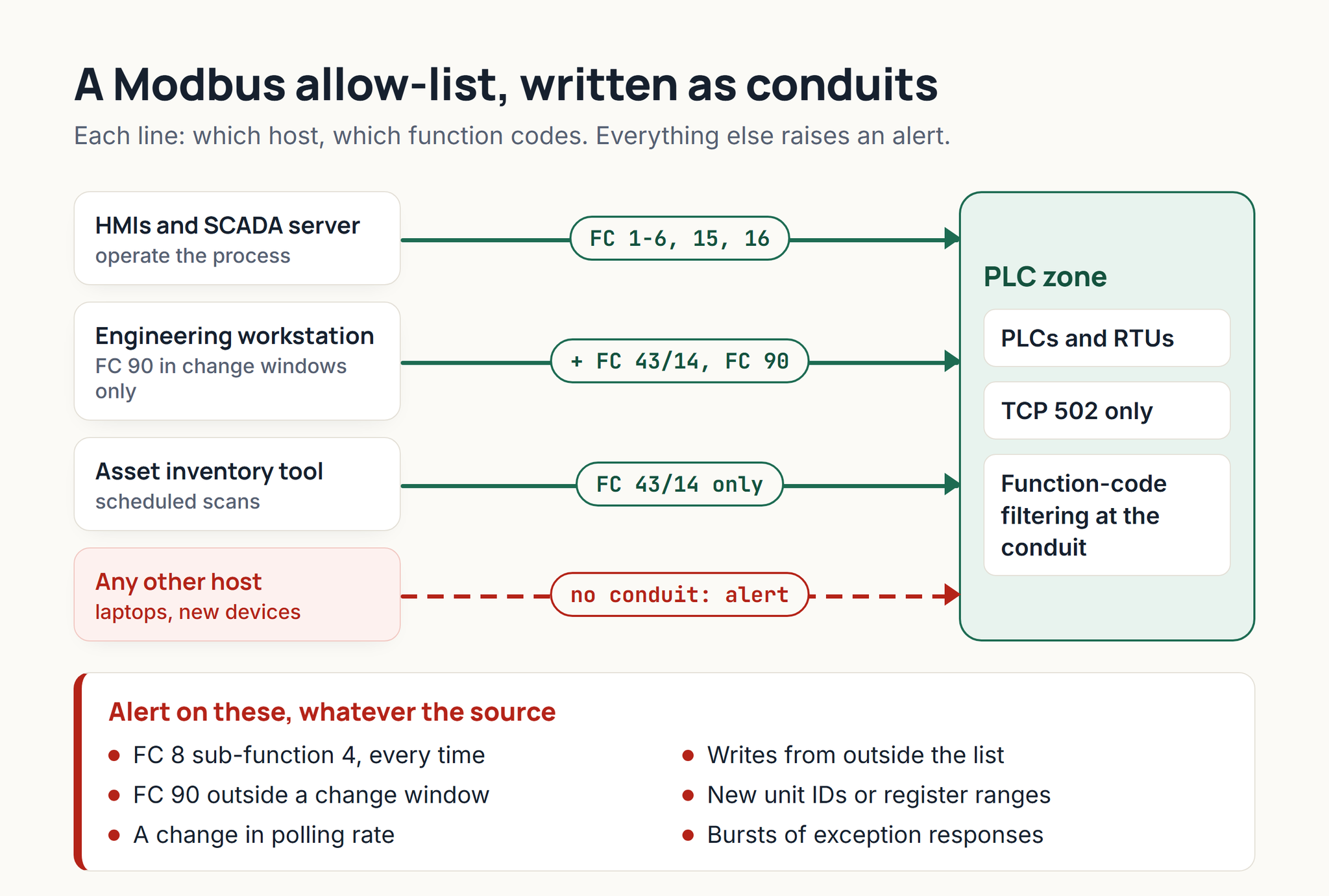
The alerts worth turning on first:
- Write codes 5, 6, 15 or 16 (and 22 or 23 if your devices support them) from any host outside the allow-list.
- FC 8 sub-function 4 from anywhere, every time.
- FC 90 outside engineering hosts or outside a change window.
- FC 43/14 from anything other than the inventory tool or an engineering workstation.
- New unit IDs, new register ranges or a change in polling rate.
- Exception responses in bulk, which usually mean a scan or a misbehaving tool.
Run new rules in alert-only mode first. Blocking a write that turns out to be legitimate, such as a batch recipe download nobody mentioned during the capture week, can stop production. Move a rule to blocking once it has been quiet through a full process cycle.
OPC UA: secure by design, insecure by configuration
OPC UA is the opposite case. The specification includes the controls Modbus lacks. Every client and server gets an X.509 certificate, and messages can be signed and encrypted. Sequence numbers catch replayed messages, and there is user authentication and an audit event model.
One common misunderstanding first. The binary protocol most plants use, opc.tcp on port 4840, is secured by OPC UA Secure Conversation, not TLS. TLS applies only to the HTTPS and WebSocket transports. Each connection runs in one of three security modes: None, Sign, or SignAndEncrypt.
What matters is whether those controls are switched on. In 2020, Dahlmanns and colleagues scanned the internet for OPC UA servers and analysed 1,114 that were reachable (ACM IMC 2020). About 92% had at least one security configuration problem. Of the 1,114, 44% allowed anonymous access with no access control, 24% offered only security mode None, and 25% offered only deprecated SHA-1 security policies.
The researchers also found devices on unrelated networks sharing the same certificate, so one stolen key could impersonate them all. Germany's BSI reached a matching verdict in its 2022 analysis: the specification is sound, and the risk sits in implementation and configuration.
The checklist for each OPC UA server:
- Security mode None is off. Offer Sign or SignAndEncrypt only.
- SHA-1 policies are off. Remove Basic128Rsa15 and Basic256; keep Basic256Sha256, Aes128_Sha256_RsaOaep or Aes256_Sha256_RsaPss.
- Anonymous access is off, or limited to read-only nodes you have chosen deliberately.
- Every server and client has its own certificate, and the trust list holds only the ones you approved. Watch for products that accept unknown certificates by default.
- Audit events are collected. Subscribe to them from a client or historian and store them centrally. The specification makes local storage on the server optional, so do not count on it.
Where this method stops
An allow-list checks who sent a request and what kind it is. It cannot tell you whether the request was wise. An attacker working from the HMI itself sends allowed writes from an allowed host, and function-code rules will pass them. Catching that needs a baseline of values and rates: a setpoint outside its normal range, or a write at 3 a.m. from a host that only writes on day shift. It also needs the HMI and engineering hosts hardened as the most valuable machines on the network.
Function-code monitoring will not stop the attack that matters most. It takes the easy attacks off the table, so anything left has to come through the few hosts you are already watching closely.
Pull 24 hours of port 502 traffic this week and count the function codes per source host. If you find a write from a host you cannot name, you have your first rule.
The free ICS Protocol Security Quick Reference puts all of this on two printable pages. Page one has the MBAP frame, the function code table and the Modbus monitoring list. Page two compares OPC Classic with OPC UA and carries a hardening checklist for each. Download it at hksmnow.com/downloads/?category=ics-ot-cybersecurity-templates.
To go further, the ICS/OT Cybersecurity Fundamentals course covers industrial protocols and their security, alongside zone and conduit design and OT risk assessment: ICS/OT Cybersecurity Fundamentals.